# What is Vendor Finance?

Vendor Finance is a loan marketplace aimed at facilitating fixed-term, fixed-rate, non-liquidation loans without an oracle dependency. There are currently two versions of the protocol, with V1 having launched in August 2022, and V2 subsequently launching in May 2023. While the core lending and borrowing principles hold true for both versions, V2 holds substantial optimizations geared toward enhancing the lending and borrowing process.&#x20;

If you have any questions, don't hesitate to reach out in our [discord](https://discord.gg/zscVwA7X). We are always happy to help.


# Vendor Finance V2

Version 2 represents a notable milestone in the progression of Vendor Finance. We have diligently incorporated user feedback received, resulting in an enhanced user experience for both lenders and borrowers. Lenders can now rest assured that their idle capital can be working for them by using a [strategy](/overview/vendor-finance-v2/strategies). V2 was also built to support different [pool types](/overview/vendor-finance-v2/how-tos), enabling faster composability and scalability of the protocol.

The most common pool type is the [Lender First Pool](/overview/vendor-finance-v2/how-tos/lender-first-pool), which features a single lender to many borrowers relationship, where the typical lending flow can be summarized by the following:

1. A single lender creates a Vendor lending pool with customized loan terms and seeds the pool with their desired capital.
2. Numerous borrowers can contribute collateral to the pool in order to secure their loans.
3. Borrower(s) are granted the period until the loan's [Repayment due date](/overview/vendor-finance-v2/definitions) to repay. Successful repayment results in the return of their collateral while failure to repay leads to collateral forfeiture to the lender while retaining the loan. This is also know as a [Default](/overview/vendor-finance-v2/definitions). The lending pools also accommodates partial repayments, enhancing borrower flexibility.

More detail can be found in the following sections.


# Use Cases

## Use case as a lender

* Allows any protocol to tap into its treasury and turn it into a lending & borrowing platform, on their own terms. Lenders can create loans out of their wallets or treasuries.
* Borrowing power is unlocked for the protocol’s native token.
* Vendor can act as a buyback mechanism. During a default period, the protocol simply get’s their own tokens back at a predetermined price acting similar to a buy-back mechanism.

{% hint style="info" %}
**Example of lending:** A protocol has $10,000,000 in USDC. The protocol can then lend out those funds at an interest rate of 1% due at the end of the month. The lender knows exactly how much interest they could make and the exact date to expect the income.&#x20;
{% endhint %}

## Use case as a borrower

* Deposit collateral instead of selling your tokens.
* Borrow without worry of liquidations.
* Reinvest the borrowed assets without a fear that the interest of the loan will outpace the yield.
* Use it as a hedge against your deposited collateral. If you loan becomes greater in value than your collateral by the repayment due date, keep your loan and default on your collateral.&#x20;
* Request loans for preatty much any asset there is.

{% hint style="info" %}
Example: A lender is accepting wETH as collateral with a lent token of USDC. You deposit your 1 wETH to receive $1,000 USDC at a fixed interest rate of 1% due at the end of the month. You can borrow the $1,000 USDC and farm at a higher interest rate of 10%.
{% endhint %}


# Benefits

{% content-ref url="/pages/tbPEb2HiJv4tdmw8AHcy" %}
[Fixed Rates](/overview/vendor-finance-v1/benefits/fixed-rates)
{% endcontent-ref %}

{% content-ref url="/pages/2Rf6if1n5ugAB1IZK2jR" %}
[No Liquidations](/overview/vendor-finance-v1/benefits/no-liquidations)
{% endcontent-ref %}

{% content-ref url="/pages/csmQpiNMiJZ5ox8eekSd" %}
[Fixed Terms](/overview/vendor-finance-v1/benefits/fixed-terms)
{% endcontent-ref %}


# Fixed Rates

A[ fixed interest rate](/overview/vendor-finance-v1/definitions) is attractive to borrowers and lenders who don’t want their interest rates fluctuating over the term of their loans

The interest rate on a fixed-rate loan remains the same during the life of the loan for an individual borrower. Because the borrower's payments stay the same, it's easier to budget for the borrower and you are not exposed to fluctuating rates. As a lender you receive a predictable income and interest.

{% hint style="warning" %}
There is an ability by the lender to change the fee later on to make sure it is still appealing to borrowers. This change would not affect people whom borrowed prior to the rate change. Once you borrow, your interest rate is locked in to whatever you agreed upon at the time of transaction.
{% endhint %}

### How to Calculate Fixed Interest Costs <a href="#mntl-sc-block_1-0-10" id="mntl-sc-block_1-0-10"></a>

Calculating fixed interest costs for a loan is relatively simple. You just need to know:

* The loan amount&#x20;
* The interest rate
* The loan repayment period

{% hint style="info" %}
Example: \
\
Loan amount = $1,000; Term Interest Rate = 1%; One month time term\
\
$1,000 x 1% = $10 in interest owed for the one month term<br>
{% endhint %}


# No Liquidations

#### Most DeFi Platforms rely on liquidations to enforce eventual repayment. Vendor uses repayment due dates.

As a borrower on Vendor you have two ways of action and under neither of them user will end up being liquidated.

1. Payback your loan on time to reclaim your collateral. Partial repayments are supported as well.
2. Do not payback your loan, keep the entirety of the lend token and [default](/overview/vendor-finance-v1/definitions) on your collateral

Due to the lack of liquidations, tokens listed on Vendor are not prone to experiencing [liquidation cascades](https://yield.app/blog/what-are-liquidation-cascades-in-crypto), which ultimately protects the holders of those tokens.


# Fixed Terms

Fixed terms help a borrower know exactly when their repayment will be required. In combination with a fixed interest rate they will know exactly how much they owe and when they owe it.&#x20;

Fixed terms help a lender know exactly when they will be paid. Again, in combination with a fixed interest rate the lender will know exactly how much they will be paid on that date.&#x20;

Having fixed terms allows a lender to create multiple terms and loan options. Having different dated loan terms would allow a borrower to [rollover](/overview/vendor-finance-v1/definitions) to another term, therefor making the loan perpetual for how ever long the lender wants.&#x20;

{% hint style="info" %}
Example: There are 2 different loans terms created by the lender, one ending on Feb. 28th and the other ending on Mar. 31st.\
\
If the borrower was in the first loan term (Feb. 28th) they could then extend it to the next one (Mar. 31st), if they choose to. \
\
Rolling over is optional for the borrower and at the lenders discretion.&#x20;
{% endhint %}


# Definitions

<mark style="color:red;">**Lend Ratio:**</mark> A lender is in charge of setting a lend ratio on their loans. A lend ratio is the amount you lend out per one unit of collateral. &#x20;

[<mark style="color:red;">**Repayment due date:**</mark>](/overview/vendor-finance-v1/definitions) A lender is in charge of setting a repayment due date. A repayment due date is the date by which the borrower repay their loan amount including interest owed.&#x20;

<mark style="color:red;">**Fixed Interest Rate:**</mark> A lender is in charge of setting a fixed interest rate for the borrower. The borrower must repay this at the repayment due date.&#x20;

<mark style="color:red;">**Perpetual:**</mark> occurring repeatedly; so frequent as to seem endless and uninterrupted. Vendor Finance accomplishes that by the means of rollovers.

<mark style="color:red;">**Rollover:**</mark> Process of migrating debt and collateral from one pool to a different pool. See Rollover section for more information.

<mark style="color:red;">**Default:**</mark> To forfeit your collateral while keeping your loan

<mark style="color:red;">**Decaying Rate:**</mark> Annualizes the interest rate throughout the term period. This makes it so whenever someone borrows they are always paying the APR you set as a lender. The rate will gradually decrease throughout the time of the loan period to ensure it hits your target APR.

<mark style="color:red;">**Strategy:**</mark> Advanced features that enable a variety of use cases. See [Strategies ](/overview/vendor-finance-v2/strategies)section for more information.

<mark style="color:red;">**Private Lending Pool:**</mark> A lending pool that was created to be a private pool. This happens by whitelisting > than 1 address in the pool creation process. See [Lender First Pool](/overview/vendor-finance-v2/how-tos/lender-first-pool) for more information.


# How To's

The smart contracts designed for Vendor Finance V2 are capable of accommodating various pool types. This page acts as a pool type table of contents.

<table data-full-width="true"><thead><tr><th width="281.3333333333333">Name</th><th width="401">Description</th><th>Loan terms set by</th></tr></thead><tbody><tr><td><a href="/overview/vendor-finance-v2/how-tos/lender-first-pool">Lender First Pool</a></td><td>Enables lenders to create a lending pool and deposit funds, while providing borrowers the opportunity to obtain loans backed by collateral.</td><td>Lender</td></tr></tbody></table>


# Lender First Pool

In this pool variant, lenders create pools with custom terms and seed it with lend funds. After the pool has been deployed, any number of borrowers can borrow from the pool until the funds have been depleted. The borrowers have until the [repayment due date](/overview/vendor-finance-v2/definitions) to repay. If they do not, they default their collateral but keep their loan. Partial repays are also supported. Once the pool has expired, lenders can collect all remaining tokens in the pool including the interest they have received.&#x20;

As a borrower, it is recommended to default your collateral to the lender if the pool's LTV is > 100% as that would indicate the value of your loan has surpassed the value of your deposited collateral.

## User Actions&#x20;

### Once a lender has deployed a pool, the lender can:

<table data-full-width="true"><thead><tr><th>Action</th><th>Description</th></tr></thead><tbody><tr><td>Deposit Funds</td><td>Adds lend funds to the pool to be borrowed out. The lender can deposit funds as many times as they wish until the <a href="/overview/vendor-finance-v2/definitions">repayment due date.</a></td></tr><tr><td>Withdraw Funds</td><td>Withdraws lend funds from pool. Lender can withdraw as many times as they with until the <a href="/overview/vendor-finance-v2/definitions">repayment due date</a> or until there are no more funds to withdraw.</td></tr><tr><td>Collect Tokens</td><td>After the <a href="/overview/vendor-finance-v2/definitions">repayment due date</a> has passed, lenders can retrieve all remaining tokens from the lending pool, encompassing lent funds, defaulted collateral, and accrued interest.</td></tr><tr><td>Whitelist Rollover pool</td><td>Lenders can whitelist a new lending pool to allow borrowers to rollover their debt into the new pool with further expiry. See <a href="#rollovers">Rollovers</a> for more information.</td></tr><tr><td>Update Borrower</td><td>Within private lending pools, lenders can whitelist or blacklist any address to be eligible to borrower from the private lending pool.</td></tr><tr><td>Change pool ownership (not recommended)</td><td>You can transfer pool ownership to another address, though this feature isn't integrated into the UI. Feel free to contact us on <a href="https://discord.gg/zscVwA7X">Discord </a>for assistance.</td></tr><tr><td>Change Fee Rate</td><td>Lenders possess the flexibility to adjust their pool's interest rate at any given moment. It's important to note that this alteration will not impact the rate for borrowers who have already taken out loans.</td></tr><tr><td>Pause Borrowing</td><td>Halts future borrowing operations.</td></tr></tbody></table>

### Once a lender has deployed a pool, anyone seeking to borrow can:

<table data-full-width="true"><thead><tr><th>Action</th><th>Description</th></tr></thead><tbody><tr><td>Borrow Funds (take out loan)</td><td>Users can deposit collateral tokens in exchange for lend tokens, a process they can repeat as often as desired, provided they have adequate collateral.</td></tr><tr><td>Repay Loan</td><td>Borrowers have the option to make partial or full repayments, with the corresponding amount of collateral being returned to them on repayment transaction. They can utilize this repayment option multiple times until their entire debt is fully settled.</td></tr><tr><td>Default on Loan</td><td>If the borrower does not want to repay, they simply don't. A case where this would happen is when the value of their loan surpasses the value of their deposited collateral at the <a href="/overview/vendor-finance-v2/definitions">repayment due date.</a> In other words, if the pools LTV is > 100%.</td></tr><tr><td>Rollover</td><td>When a lender offers a <a href="#rollovers">rollover </a>pool, borrowers have the opportunity to transfer their debt from the original pool to the designated destination pool - the idea being to extend their duration.</td></tr></tbody></table>

## Terms

As a pool creator (lender), you will be able to set the below terms when deploying your lending pool.&#x20;

### **Pool Terms**

<table data-full-width="true"><thead><tr><th>Field</th><th>Description</th></tr></thead><tbody><tr><td>Collateral</td><td>Token that lender wishes to accept as collateral </td></tr><tr><td>Lend Token</td><td>Token that lender wishes to lend </td></tr><tr><td>Lend Ratio (LR)</td><td>Describes the relationship between lend token units and deposited collateral units. For instance, an LR of 100 signifies that 100 lend tokens are loaned per unit of deposited collateral</td></tr><tr><td>Initial Deposit Amount</td><td>Amount of lend tokens you would like to deposit in single pool creation transaction</td></tr><tr><td>Due Date</td><td>Loan repayment or <a href="/overview/vendor-finance-v2/definitions">default </a>deadline.</td></tr><tr><td>Oracle Protection</td><td>When enabled, automatically disables the pool from being borrowed from if the value of the loan would be greater than the value of the collateral. This is to protect lenders from undercollateralized borrowing.</td></tr></tbody></table>

### **Pool Rate**

{% hint style="info" %}
While you have the flexibility to choose any APR you prefer, it is advisable to opt for a sensible rate. Doing so will attract borrowers more effectively to utilize your pool for borrowing.
{% endhint %}

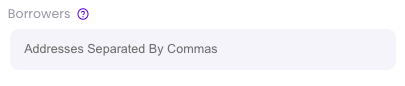
<table data-full-width="true"><thead><tr><th>Field </th><th>Description</th></tr></thead><tbody><tr><td>Term Rate Type</td><td><p>Two rate types:</p><ol><li><strong>Fixed APR</strong> - Annualized at the chosen APR.</li><li><strong>Fixed Rate</strong> - Constant borrower payment regardless of proximity to due date.</li></ol></td></tr><tr><td>APR</td><td>The interest rate applied to the chosen "Term Rate Type"</td></tr><tr><td>Borrowers</td><td>This acts as a whitelist for private lending. Leave empty to keep pool public. If public, the pool cannot be made private later. The decision to make your pool public or private must happen in the pool creation phase.</td></tr><tr><td><a href="/overview/vendor-finance-v2/strategies">Select a Pool Strategy</a></td><td>Certain strategies are applicable to specific tokens or pool types. Any usable strategy will be displayed here. See <a href="/overview/vendor-finance-v2/strategies">Strategies </a>for more information.</td></tr></tbody></table>

## **Fees Involved**

### **Borrower fees**

<table data-full-width="true"><thead><tr><th>Fee</th><th>Description</th></tr></thead><tbody><tr><td>Protocol Fee</td><td>0.3% of borrowed funds are allocated to the protocol treasury upon loan initiation</td></tr><tr><td>Lender Fee</td><td>This represents the interest paid to lender's at the inception of the loan. This amount comes out of the borrowed funds and stays in the pool.</td></tr></tbody></table>

*\*Both fees are applied when rolling debt over between pools*

{% hint style="info" %}
Example:

Protocol fee = 0.3%

Loan APR (interest rate) = 1%

1\) Borrower takes loan of 1000 USDC

* 1000 \* 0.3% = 3 USDC -> Sent to protocol treasury
* 1000 \* 1% = 10 USDC -> Remains in pool to be collected by lender after repayment due date
* 1000 - 3 - 10 = 987 USDC -> Sent to borrower
  {% endhint %}

*\*Borrower fees are subject to change if deemed necessary*

### **Lender Fees**

The lender incurs no fees.

## Rollovers

A rollover pool is the same as any other pool that is created. The only difference is the rollover pool has a further out expiry and the lender must whitelist it. Additionally, a rollover pool must be deployed from the same address you deployed the original pool with.&#x20;

{% hint style="info" %}
The collateral and lend token of a new pool must be the same as in the origin pool for the new pool to be considered a rollover pool. **The Lend Ratio, Interest Rate and Expiry can be different from the prior pool!**
{% endhint %}

{% hint style="info" %}
Example:

1\) Lender creates WETH<>USDC pool with [repayment due date](/overview/vendor-finance-v2/definitions) of **May 1st (pool A)**

2\) Borrower borrows from **pool A**

3\) Lender creates new WETH<>USDC pool with repayment due date of **June 1st (pool B)**

4\) Lender whitelists **pool B** from **pool A** to allow borrowers from **pool A** to rollover their debt into **pool B**, thereby extending their loan.

5\) Borrower rolls their debt over from **pool A** to **pool B**, effectively granting them a loan extension to **June 1st**. At this point, the borrowers debt and collateral are associated with **pool B**, so any future repayments will be done in **pool B**.
{% endhint %}

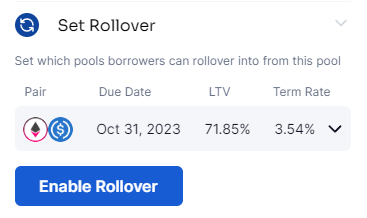
To add your new pool to the rollover list, go to the "My Pools" tab, select the desired pool, then click on the "Set Rollover" tab under Deployed Pool Options. You'll see a list of eligible rollover pools.

<figure><img src="https://2063343056-files.gitbook.io/~/files/v0/b/gitbook-x-prod.appspot.com/o/spaces%2Fg8qKWWZHuPuVpIKaKuKR%2Fuploads%2FauVTsqwLkrueaJnfEySx%2FScreenshot%202023-08-16%20142835.png?alt=media&amp;token=d8829ee1-34f1-46ad-bc60-4ce39f2abec5" alt=""><figcaption></figcaption></figure>

Once enabled, borrowers from your origin pool can rollover their debt from the origin pool to the destination pool.

## Undercollateralized Borrowing Protection&#x20;

**Oracle Protection**, as indicated in the[ pool terms](#terms) section, allows lenders to activate or deactivate undercollateralized lending. If the tokens within your pool are linked to an oracle, our Vendor lending pools possess the capability to automatically halt borrowing if the value of the lend tokens exceeds the collateral amount that a borrower wants to deposit. This serves as a safeguard for situations where the prices of the pool tokens experience price fluctuations, and protect lenders from losing money.

{% hint style="info" %}
Note:&#x20;

Lenders retain the option to manually pause their pools whenever desired, accessible through the "My Pools" tab. The oracle check is performed precisely at the moment a borrowing transaction is initiated.
{% endhint %}


# Navigating the Create Pool Page

## Create a Pool

Lenders can create a pool by using the pool creation widget. Information about each field can be found in the table below the image.

<figure><img src="https://2063343056-files.gitbook.io/~/files/v0/b/gitbook-x-prod.appspot.com/o/spaces%2Fg8qKWWZHuPuVpIKaKuKR%2Fuploads%2FbPJPnsiQdh4kuUeXjtFw%2FScreenshot%202023-08-18%20134750.png?alt=media&amp;token=135194c0-29ce-4f76-bfe0-31a0e34ee76e" alt=""><figcaption><p>Create Pool Widget (in red box outline)</p></figcaption></figure>

<table data-full-width="true"><thead><tr><th>Field</th><th>Description</th></tr></thead><tbody><tr><td>Collateral</td><td>Token that lender wishes to accept as collateral </td></tr><tr><td>Lend Token</td><td>Token that lender wishes to lend </td></tr><tr><td>Lend Ratio (LR)</td><td>Describes the relationship between lend token units and deposited collateral units. For instance, an LR of 100 signifies that 100 lend tokens are loaned per unit of deposited collateral</td></tr><tr><td>Initial Deposit Amount</td><td>Amount of lend tokens you would like to deposit in single pool creation transaction</td></tr><tr><td>Due Date</td><td>Loan repayment or <a href="/overview/vendor-finance-v2/definitions">default </a>deadline.</td></tr><tr><td>Oracle Protection</td><td>When enabled, automatically disables the pool from being borrowed from if the value of the loan would be greater than the value of the collateral. This is to protect lenders from undercollateralized borrowing.</td></tr></tbody></table>

Once you have selected your initial terms, you will have additional fee rate options.

<figure><img src="https://2063343056-files.gitbook.io/~/files/v0/b/gitbook-x-prod.appspot.com/o/spaces%2Fg8qKWWZHuPuVpIKaKuKR%2Fuploads%2F3yUXc4cVweeZ7s5DseKd%2FScreenshot%202023-08-18%20135520.png?alt=media&amp;token=ffa50387-9749-4249-abd0-014b525140cd" alt=""><figcaption><p>Fee terms (in red box outline)</p></figcaption></figure>

<table data-full-width="true"><thead><tr><th>Field </th><th>Description</th></tr></thead><tbody><tr><td>Term Rate Type</td><td><p>Two rate types:</p><ol><li><strong>Fixed APR</strong> - Annualized at the chosen APR.</li><li><strong>Fixed Rate</strong> - Constant borrower payment regardless of proximity to due date.</li></ol></td></tr><tr><td>APR</td><td>The interest rate applied to the chosen "Term Rate Type"</td></tr><tr><td>Borrowers</td><td>This acts as a whitelist for private lending. Leave empty to keep pool public. If public, the pool cannot be made private later. The decision to make your pool public or private must happen in the pool creation phase.</td></tr><tr><td><a href="/overview/vendor-finance-v2/strategies">Select a Pool Strategy</a></td><td>Certain strategies are applicable to specific tokens or pool types. Any usable strategy will be displayed here. See <a href="/overview/vendor-finance-v2/strategies">Strategies </a>for more information.</td></tr></tbody></table>

Once the preferred terms have been selected, you are ready to review your pool options and proceed with pool deployment.

<figure><img src="https://2063343056-files.gitbook.io/~/files/v0/b/gitbook-x-prod.appspot.com/o/spaces%2Fg8qKWWZHuPuVpIKaKuKR%2Fuploads%2FJnPfhWOhHJDSeTmAVOuk%2Fdep.png?alt=media&amp;token=86d4a470-dc71-4f7b-ada1-d416aa8a4092" alt=""><figcaption><p>Review terms and Deploy Pool (in red box outline)</p></figcaption></figure>

After your pool deployment transaction successfully completes, the image below will become visible. By selecting "Go To Pool," you will be directed to the ["My Pools"](/overview/vendor-finance-v2/how-tos/lender-first-pool/navigating-my-pools-page) page.

<figure><img src="https://2063343056-files.gitbook.io/~/files/v0/b/gitbook-x-prod.appspot.com/o/spaces%2Fg8qKWWZHuPuVpIKaKuKR%2Fuploads%2FfNXJKbIoZ96f4rW2CdBS%2FScreenshot%202023-08-14%20181545.png?alt=media&amp;token=e886ee9d-e9b7-4b6c-a1ca-49cf157435f7" alt=""><figcaption></figcaption></figure>

## Request a Pool

As a borrower, you might encounter situations where the available pool terms do not align with your borrowing preferences. To address this, we've implemented a feature that allows individuals to request customized pool terms. An interested lender can review these requested terms and subsequently establish a pool to accommodate them. While lenders aren't bound to adhere precisely to these terms, they serve as insights into the preferences of borrowers when creating pools.

<figure><img src="https://2063343056-files.gitbook.io/~/files/v0/b/gitbook-x-prod.appspot.com/o/spaces%2Fg8qKWWZHuPuVpIKaKuKR%2Fuploads%2FYiR0h5hoiu1ut19zHste%2FScreenshot%202023-08-18%20135809.png?alt=media&amp;token=de4621bf-a687-4821-8bc1-5602acd9c024" alt=""><figcaption><p>Submit Pool Request (in red box outline)</p></figcaption></figure>

After selecting "Submit Pool Request," your page will transition into the pool request mode. The interface will closely resemble the process of creating and deploying a pool, with the key difference being that no pool will be deployed, only a request. As highlighted by the prominent banner at the top of the screen, you are now actively engaged in pool request mode.

<figure><img src="https://2063343056-files.gitbook.io/~/files/v0/b/gitbook-x-prod.appspot.com/o/spaces%2Fg8qKWWZHuPuVpIKaKuKR%2Fuploads%2FNabiOIdqqd1wEOMrEI7G%2FScreenshot%202023-08-18%20135930.png?alt=media&amp;token=5032c75a-ccba-4ca5-b53a-c095991266ea" alt=""><figcaption><p>Pool Request Mode</p></figcaption></figure>


# Navigating My Pools Page

## Add or Withdraw funds from Pool

At any time before a pool has reached its [repayment due date](/overview/vendor-finance-v2/definitions), a lender can always add or withdraw unborrowed lend funds. To do so, navigate to the "My Pools" tab and you will then see the following widget. Type in the number of funds you wish to add or withdraw, or click "Balance" to apply the maximum. Next, click "Add" or "Withdraw" respectively and you will be prompted for wallet approval. Once approved successfully you may proceed with the desired transaction.&#x20;

<figure><img src="https://2063343056-files.gitbook.io/~/files/v0/b/gitbook-x-prod.appspot.com/o/spaces%2Fg8qKWWZHuPuVpIKaKuKR%2Fuploads%2FID7WHH4aTHDP7xmLCEEA%2Fadd_funds.png?alt=media&amp;token=be987d67-7826-4803-8f8e-a579fb36b3a2" alt=""><figcaption><p>Add or Withdraw Funds Widget (in red box outline)</p></figcaption></figure>

## Deployed Pool Options

As a lender, after deploying a pool, you will have access to the following options.

<table data-full-width="true"><thead><tr><th>Field</th><th>Description</th></tr></thead><tbody><tr><td>Update Fee Rate</td><td>Enables lender to change the APR for any of their active pools. Borrowers who have already borrowed before the rate is changed retain their original rate.</td></tr><tr><td>Pause Borrowing</td><td>Enables lenders to pause their pool, disabling borrowers from borrowing.</td></tr><tr><td>Set Rollover</td><td>Whitelist pool to enable borrowers to rollover their debt from origin pool to destination pool.</td></tr><tr><td>Pool Reactions</td><td>If someone has reacted to your pool, the reaction list will show up here.</td></tr><tr><td>Feature Pool</td><td>Allows lenders to pay a small fee in ETH for their pool to be added to the "Featured Pools" section on the borrow page.</td></tr></tbody></table>

<div data-full-width="false"><figure><img src="https://2063343056-files.gitbook.io/~/files/v0/b/gitbook-x-prod.appspot.com/o/spaces%2Fg8qKWWZHuPuVpIKaKuKR%2Fuploads%2F1DHHFAAcdu5mDBZWKuNB%2Fpool_options.png?alt=media&amp;token=456c64c2-dd49-47cf-9c6e-02d18fbfe5c4" alt=""><figcaption><p>Deployed Pool Options (in red box outline)</p></figcaption></figure></div>

## Deployed Pool Information

To see information about pools where you are the lender, simply click on the desired pool from the list to see it's stats.

<table data-full-width="true"><thead><tr><th>Field</th><th>Description</th></tr></thead><tbody><tr><td>Collateral price &#x26; Borrow Value</td><td>Graph displaying the prices of both collateral and lend assets.</td></tr><tr><td>Pool Utilization</td><td>Shows how much of your pools lend funds have been lent out. Also shows fees earned as well as the <a href="/overview/vendor-finance-v2/strategies">strategy </a>rate if applicable.</td></tr><tr><td>Active Pools</td><td>Pools that have not yet reached the <a href="/overview/vendor-finance-v2/definitions">repayment due date</a>.</td></tr><tr><td>Expired Pools</td><td>Click here to see your pools that have passed the <a href="/overview/vendor-finance-v2/definitions">repayment due date</a>. As a lender, you will be able to collect any funds from your pool here.</td></tr></tbody></table>

<figure><img src="https://2063343056-files.gitbook.io/~/files/v0/b/gitbook-x-prod.appspot.com/o/spaces%2Fg8qKWWZHuPuVpIKaKuKR%2Fuploads%2F9TD2U0SrChE6vrddM077%2Fpool_stats.png?alt=media&amp;token=9d9f0aa6-6e2d-4d39-95d3-0afb16b07c12" alt=""><figcaption><p>Pool Stats (in red box outline)</p></figcaption></figure>

## Collect Pool funds after Repayment Due Date

After one of your pools has reached its expiration date, you can retrieve your tokens from the "Expired Pools" list. Just above the collection button, you'll find information indicating the quantities of lend and collateral assets available for you to collect.

<figure><img src="https://2063343056-files.gitbook.io/~/files/v0/b/gitbook-x-prod.appspot.com/o/spaces%2Fg8qKWWZHuPuVpIKaKuKR%2Fuploads%2FpLxCyxeuu1I0uvzJ5HsS%2FCollect.png?alt=media&amp;token=528fe5e4-355c-4b55-8084-ff3740f7e8bb" alt=""><figcaption><p>Collect Funds Widget (in red box outline)</p></figcaption></figure>


# Navigating the Borrow Page

## Borrow Funds

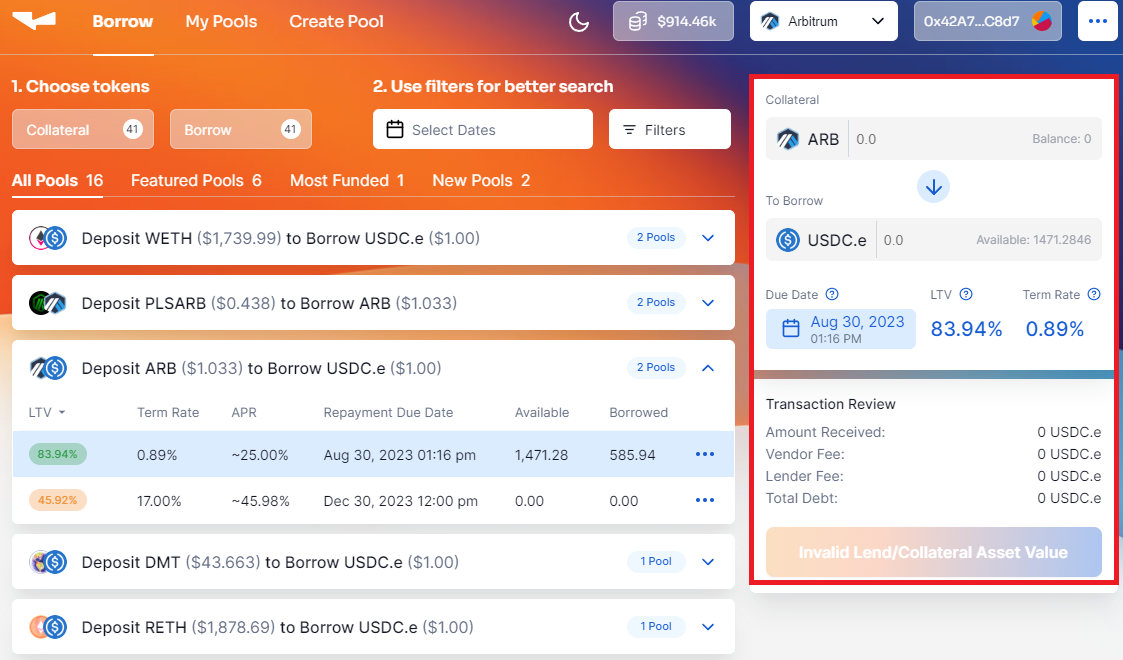
To borrow funds from a pool, simply click on your desired pool, if the terms are acceptable, fill in the "Collateral" to deposit with your desired collateral, or enter the exact amount of lend funds you wish to borrow.&#x20;

<figure><img src="https://2063343056-files.gitbook.io/~/files/v0/b/gitbook-x-prod.appspot.com/o/spaces%2Fg8qKWWZHuPuVpIKaKuKR%2Fuploads%2FJvilylbfF5KGtI6sCMfL%2Fborrow.png?alt=media&amp;token=54987c82-2d10-4cf7-8c1d-a6af3747bbb8" alt=""><figcaption><p>Borrow Funds widget (in red box outline)</p></figcaption></figure>

## Find Specific Pools

The lending platform provides borrowers with a variety of options to discover their preferred pools. You have the flexibility to select the exact token types you wish to borrow, search for pools based on their expiration dates and funding status, and explore many other filtering capabilities.

<figure><img src="https://2063343056-files.gitbook.io/~/files/v0/b/gitbook-x-prod.appspot.com/o/spaces%2Fg8qKWWZHuPuVpIKaKuKR%2Fuploads%2FtnD04AGTQEHsIatQXd93%2Ffilters.png?alt=media&amp;token=ac08adb7-0fe3-4293-a7fa-a7406ca35fc2" alt=""><figcaption><p>Pool Filters (in red box outline)</p></figcaption></figure>


# Strategies

"Strategies" is a comprehensive term employed to encompass sophisticated methodologies for lending and borrowing. These methodologies provide avenues to optimize your capital efficiency.

## 1) USDC.e Lending Strategy&#x20;

This strategy enables lenders to optimize their capital efficiency by effectively utilizing their idle lend funds. Conventionally, when a lender seeds capital into their pool, they must await its utilization before accruing interest. In contrast, employing this strategy involves directing any USDC.e utilized as the lending asset through the pool, ultimately channeling it into the AAVE USDC.e lending market. This grants lenders the opportunity to earn an AAVE rate while awaiting the borrowers to borrower their funds on their own terms. Subsequently, when a borrower opts to borrow, the lend funds are withdrawn from AAVE and sent to the borrower.

Implementing this strategy is straightforward and happens on the pool deployment process. If the lend asset you wish to use is USDC.e, you will see the AAVE strategy as an option. Once selected, no additional overhead is required. The smart contracts will handle the rest.&#x20;

<figure><img src="https://2063343056-files.gitbook.io/~/files/v0/b/gitbook-x-prod.appspot.com/o/spaces%2Fg8qKWWZHuPuVpIKaKuKR%2Fuploads%2FSEscdGnrsqzTxJ70fW53%2FScreenshot%202023-08-15%20132640.png?alt=media&amp;token=e8119ba5-212e-4efc-a8d1-7a80e4122f5b" alt=""><figcaption><p>AAVE USDC.e Strategy</p></figcaption></figure>

| Strategy                | Applicable Pool Type | Network  |
| ----------------------- | -------------------- | -------- |
| USDC.e Lending Strategy | Lender First Pool    | Arbitrum |


# Protocol Fees/Pool Type

Each pool type will have an associated protocol fee. To learn more about this fee, please visit the relevant pool type's information where you will find a "Fee" section.

<table data-full-width="true"><thead><tr><th>Pool Type</th><th>Fee Amount</th><th>Fee applied to</th></tr></thead><tbody><tr><td><a href="/overview/vendor-finance-v2/how-tos/lender-first-pool">Lender First Pool</a></td><td>0.3% of the borrowed funds</td><td>Borrower</td></tr></tbody></table>


# Developer Documentation

Developer documentation for Vendor Finance Protocol Version 2 can be found [here](https://vendorfinance.gitbook.io/vendor-finance-v2-developer-documentation/).


# Vendor Finance V1

Version 1 offers users the opportunity to engage as either lenders or borrowers. Lenders have the capability to establish lending pools and levy interest, whereas borrowers can secure loans from lenders by pledging collateral.

The typical lending flow can be summarized by the following:

1\) A single lender creates a Vendor lending pool with customized loan terms, and seeds the pool with their desired lending capital.

2\) Numerous borrowers can contribute collateral to the pool in order to secure their loans.

3\) Borrower(s) are granted the period until the loan's[ Repayment due date](/overview/vendor-finance-v1/definitions) to repay. Successful repayment results in the return of their collateral while failure to repay leads to collateral forfeiture to the lender while retaining the loan. This is also know as a [Default](/overview/vendor-finance-v1/definitions). The lending pools also accommodates partial repayments, enhancing borrower flexibility.

More detail can be found in the following sections.&#x20;


# Use cases

### Use case as a lender

* Allows any protocol to tap into its treasury and turn it into a lending & borrowing platform, on their own terms. **A lender can lend assets out of their treasury or wallet, which would allow them to earn interest on their otherwise idle funds**
* Borrowing power is unlocked for the protocol’s native token.
* Can act as a buyback mechanism. **During a default period, the protocol simply get’s their own tokens back at a predetermined price which reduces circulating supply or can be given to token holders**
* Can be used as a funding/raising tool in the future (roadmap item)

{% hint style="info" %}
**Example of lending:** A protocol has $10,000,000 in USDC. The protocol can then lend out those funds at an interest rate of 1% due at the end of the month. The lender knows exactly how much interest they will make and the exact date to expect the income.&#x20;
{% endhint %}

### Use case as a borrower

* Deposit collateral instead of selling your token for funds
* Borrow without worry of liquidations
* Do anything you want with your loan including farming at a higher APR than your loan
* Use it as a hedge against your deposited collateral. If you loan becomes greater in value than your collateral by the repayment due date, keep you loan and default on your collateral.&#x20;
* Borrowing power is unlocked for the native token holder

{% hint style="info" %}
Example: A lender is accepting wETH as collateral with a lent token of USDC. You deposit your 1 wETH to receive $1,000 USDC at a fixed interest rate of 1% due at the end of the month. You can borrow the $1,000 USDC and farm at a higher interest rate of 10%.
{% endhint %}


# Benefits

{% content-ref url="/pages/tbPEb2HiJv4tdmw8AHcy" %}
[Fixed Rates](/overview/vendor-finance-v1/benefits/fixed-rates)
{% endcontent-ref %}

{% content-ref url="/pages/2Rf6if1n5ugAB1IZK2jR" %}
[No Liquidations](/overview/vendor-finance-v1/benefits/no-liquidations)
{% endcontent-ref %}

{% content-ref url="/pages/csmQpiNMiJZ5ox8eekSd" %}
[Fixed Terms](/overview/vendor-finance-v1/benefits/fixed-terms)
{% endcontent-ref %}


# No Liquidations

#### There are **no liquidations** for borrowers. A borrower has two options:

1. Payback your loan to receive your collateral back&#x20;
2. Do not payback your loan, keep the lent token and [default](/overview/vendor-finance-v1/definitions) on your collateral

**Since there are no liquidations with VENDOR, the protocol’s native token suffers less of an impact in a down trending market. In return protecting the protocols token holders as a whole.**&#x20;


# Fixed Rates

A[ fixed interest rate](/overview/vendor-finance-v1/definitions) is attractive to borrowers and lenders who don’t want their interest rates fluctuating over the term of their loans

The interest rate on a fixed-rate loan remains the same during the life of the loan for an individual borrower. Because the borrower's payments stay the same, it's easier to budget for the borrower and you are not exposed to fluctuating rates. As a lender you receive a predictable income and interest.

{% hint style="warning" %}
There is an ability by the lender to change the fee later on to make sure it is still appealing to borrowers. This change would not affect people whom borrowed prior to the rate change. Once you borrow, your interest rate is locked in to whatever you agreed upon at the time of transaction.
{% endhint %}

### How to Calculate Fixed Interest Costs <a href="#mntl-sc-block_1-0-10" id="mntl-sc-block_1-0-10"></a>

Calculating fixed interest costs for a loan is relatively simple. You just need to know:

* The loan amount&#x20;
* The interest rate
* The loan repayment period

{% hint style="info" %}
Example: \
\
Loan amount = $1,000; Term Interest Rate = 1%; One month time term\
\
$1,000 x 1% = $10 in interest owed for the one month term<br>
{% endhint %}


# Fixed Terms

Fixed terms help a borrower know exactly when their repayment will be required. In combination with a fixed interest rate they will know exactly how much they owe and when they owe it.&#x20;

Fixed terms help a lender know exactly when they will be paid. Again, in combination with a fixed interest rate the lender will know exactly how much they will be paid on that date.&#x20;

Having fixed terms allows a lender to create multiple terms and loan options. Having different dated loan terms would allow a borrower to [rollover](/overview/vendor-finance-v1/definitions) to another term, therefor making the loan perpetual for how ever long the lender wants.&#x20;

{% hint style="info" %}
Example: There are 2 different loans terms created by the lender, one ending on Feb. 28th and the other ending on Mar. 31st.\
\
If the borrower was in the first loan term (Feb. 28th) they could then extend it to the next one (Mar. 31st), if they choose to. \
\
Rolling over is optional for the borrower and at the lenders discretion.&#x20;
{% endhint %}


# Definitions

<mark style="color:red;">**Lend Ratio:**</mark> A lender is in charge of setting a lend ratio on their loans. A lend ratio is the amount you lend out per one unit of collateral. &#x20;

[<mark style="color:red;">**Repayment due date:**</mark>](/overview/vendor-finance-v1/definitions) A lender is in charge of setting a repayment due date. A repayment due date is the date by which the borrower repay their loan amount including interest owed.&#x20;

<mark style="color:red;">**Fixed Interest Rate:**</mark> A lender is in charge of setting a fixed interest rate for the borrower. The borrower must repay this at the repayment due date.&#x20;

<mark style="color:red;">**Perpetual:**</mark> occurring repeatedly; so frequent as to seem endless and uninterrupted. Vendor Finance accomplishes that by the means of rollovers.

<mark style="color:red;">**Rollover:**</mark> Process of migrating debt and collateral from one pool to a different pool. See Rollover section for more information.

<mark style="color:red;">**Default:**</mark> To forfeit your collateral while keeping your loan

<mark style="color:red;">**Decaying Rate:**</mark> Annualizes the interest rate throughout the term period. This makes it so whenever someone borrows they are always paying the APR you set as a lender. The rate will gradually decrease throughout the time of the loan period to ensure it hits your target APR.


# Lend

Lending made simple!

{% hint style="warning" %}
The interest rate is defaulted to a "Decaying Rate", this makes the rate annualized. This is recommended.
{% endhint %}

### **A lender must first create a pool in order to lend to a borrower.**

**Step 1:** Choose "Create Pool"&#x20;

**Step 2:** Select the collateral token you wish to accept from the dropdown menu

**Step 3:** Select the token you would like to lend from the dropdown menu

**Step 4:** Set a [lend ratio](/overview/vendor-finance-v1/definitions)

**Step 5:** Select a [repayment due date](/overview/vendor-finance-v1/definitions)&#x20;

**Step 6.** Set a [fixed interest rate ](/overview/vendor-finance-v1/definitions)**(this is defaulted to a** [**decaying rate**](/overview/vendor-finance-v1/definitions)**)**. &#x20;

{% hint style="warning" %}
Regarding **Step 6** - Once the borrower borrow, their interest rate is locked in to whatever they agreed upon at the time of transaction.
{% endhint %}

**Step 8.** Review the pool deployment details and deploy the pool&#x20;

**Step 9.** Seed the pool with the tokens you wish to lend out by going to the My Pools tab and selecting you lend poo&#x6C;**. Click add funds.&#x20;**&#x20;NOTE: You can also do this by sending the tokens directly to the pool contract displayed once you create the pool in step 8

**Step 10.** Provide the loan agreement link to your borrowers or embed the link on your website. It will also show up under explore tab!

**Optional:** You can create private pools by adding specific addresses under the borrowers tab. Only these addresses will be able to borrow.

<figure><img src="https://2063343056-files.gitbook.io/~/files/v0/b/gitbook-x-prod.appspot.com/o/spaces%2Fg8qKWWZHuPuVpIKaKuKR%2Fuploads%2FYa7cIQ3D5IpPB7tUwtuT%2FScreen%20Shot%202022-09-02%20at%2011.32.13%20AM.png?alt=media&amp;token=d5995ec8-d0e7-4cde-b90a-a64a7b6c2953" alt=""><figcaption></figcaption></figure>

{% hint style="success" %}
Congratulations, you have created a loan agreement, users can now borrow!
{% endhint %}

## Visual Tutorial

**1. Navigate to&#x20;**<mark style="color:blue;">**<https://vendor.finance/create-pool>**</mark>

**2. Click "Connect Wallet"**

![](https://image.scribehow-prod.com/FcNSJE7riPRDCFVIscjikpPFgqTbx6CDQY4hbDFCwYE/zoom:1.669150521609538/enlarge:true/crop:671:377:nowe:1076:0/wm:0.8:nowe:535:40:0.08928571428571429/aHR0cHM6Ly9jb2xvbnktcmVjb3JkZXIuczMuYW1hem9uYXdzLmNvbS9maWxlcy8yMDIyLTA5LTAyLzJmNzliMDEyLTc3ZjYtNGQ5OC1iNTkyLThiYzVlMWUzMjRkYi9hc2NyZWVuc2hvdC5qcGVn)

**3. Click the option you want to connect too.**

![](https://image.scribehow-prod.com/sEKA7BM1JnFPjeuSOEI3EzLUFMx1SUjLPK7j7_gYbNc/zoom:1.669150521609538/enlarge:true/crop:671:377:nowe:674:191/wm:0.8:nowe:535:290:0.08928571428571429/aHR0cHM6Ly9jb2xvbnktcmVjb3JkZXIuczMuYW1hem9uYXdzLmNvbS9maWxlcy8yMDIyLTA5LTAyLzI4OTdlZDUwLWQ5MWYtNDk0ZC05NjRlLTU2NTQwYjU2YzIzNC9hc2NyZWVuc2hvdC5qcGVn)

**4. Click the collateral drop down**

![](https://image.scribehow-prod.com/jxlgg-3z9hcBmARUBBsiNwGmtPXwCu27USpLekmvTLQ/zoom:1.669150521609538/enlarge:true/crop:671:377:nowe:918:0/wm:0.8:nowe:535:191:0.08928571428571429/aHR0cHM6Ly9jb2xvbnktcmVjb3JkZXIuczMuYW1hem9uYXdzLmNvbS9maWxlcy8yMDIyLTA5LTAyLzYwN2ViMDY5LWU0YWItNDdiNS1iM2IzLWEwY2Q2YTk0ZmE5NC9hc2NyZWVuc2hvdC5qcGVn)

**5. Click the collateral you wish to accept**

![](https://image.scribehow-prod.com/ghqpOlqTXvK8HCozjZ4h_ixkEFPrTfJOcuPsRnrjQGA/zoom:1.669150521609538/enlarge:true/crop:671:377:nowe:629:419/wm:0.8:nowe:535:290:0.08928571428571429/aHR0cHM6Ly9jb2xvbnktcmVjb3JkZXIuczMuYW1hem9uYXdzLmNvbS9maWxlcy8yMDIyLTA5LTAyL2FjNzlkZWIwLTgwYmUtNDljNS1iZTcwLWE0ZWVlYmYwZDMxMS9hc2NyZWVuc2hvdC5qcGVn)

**6. Click the lend token drop down**

![](https://image.scribehow-prod.com/ifpHgmGN_VBJ18z8zCONYkYYg7XCX0qr8arLASzY6Qw/zoom:1.669150521609538/enlarge:true/crop:671:377:nowe:1084:0/wm:0.8:nowe:535:206:0.08928571428571429/aHR0cHM6Ly9jb2xvbnktcmVjb3JkZXIuczMuYW1hem9uYXdzLmNvbS9maWxlcy8yMDIyLTA5LTAyLzUwMzExMDkxLTZlODItNDM0YS05OWEwLTRlYTZiMWVkYmVlZC9hc2NyZWVuc2hvdC5qcGVn)

**7. Click the lend token you wish to lend**

![](https://image.scribehow-prod.com/9kneoeaWEMOZAdkx0ES01qQda7_GYzUf5zNN_koYjlM/zoom:1.669150521609538/enlarge:true/crop:671:377:nowe:651:370/wm:0.8:nowe:535:290:0.08928571428571429/aHR0cHM6Ly9jb2xvbnktcmVjb3JkZXIuczMuYW1hem9uYXdzLmNvbS9maWxlcy8yMDIyLTA5LTAyLzQxNjc5YzMxLThkNDUtNDE2Yi1hZjRkLTVkMmY4MzA1NjhmZS9hc2NyZWVuc2hvdC5qcGVn)

**8. Choose your** [lend ratio](/overview/vendor-finance-v1/definitions) **ratio. There are presets or you can choose custom. When entering custom you put the amount of lend token. The** [lend ratio](/overview/vendor-finance-v1/definitions)  **is the amount of Lend token you give per 1 unit of collateral. In this example, for every 1 wBTC a borrower deposits, they will receive 410.697 USDC**

![](https://image.scribehow-prod.com/fY-IcfaAxPVJYB5cnVKL_dIsCFrxtKafLdXjGtyTfrE/zoom:1.669150521609538/enlarge:true/crop:671:377:nowe:1022:24/wm:0.8:nowe:535:290:0.08928571428571429/aHR0cHM6Ly9jb2xvbnktcmVjb3JkZXIuczMuYW1hem9uYXdzLmNvbS9maWxlcy8yMDIyLTA5LTAyLzYzMTdkNGNlLTI5MGEtNDdlZC1iMDUwLWE1NDE5NWU1NThhMy9hc2NyZWVuc2hvdC5qcGVn)

**9. Click the "Expiry Date & Time" field.**

![](https://image.scribehow-prod.com/f1mDOV3wq2X1M9IuxtEdUXIRDokAbQ0L4inDb_n04UY/zoom:1.669150521609538/enlarge:true/crop:671:377:nowe:906:117/wm:0.8:nowe:535:290:0.08928571428571429/aHR0cHM6Ly9jb2xvbnktcmVjb3JkZXIuczMuYW1hem9uYXdzLmNvbS9maWxlcy8yMDIyLTA5LTAyL2EyMDYwMmFhLTFhYzEtNDFlMy05ZDU2LWM2M2M1OGYyZjE3Zi9hc2NyZWVuc2hvdC5qcGVn)

**10. Choose the month and day you want the loan to expire**

![](https://image.scribehow-prod.com/yhN9ebAwFwrEFnr7GfecGagUOeaBmtpfrTk9Upikkdo/zoom:1.669150521609538/enlarge:true/crop:671:377:nowe:693:332/wm:0.8:nowe:535:290:0.08928571428571429/aHR0cHM6Ly9jb2xvbnktcmVjb3JkZXIuczMuYW1hem9uYXdzLmNvbS9maWxlcy8yMDIyLTA5LTAyL2FlMTkwOGE0LTc4MDItNDVjYy1iZTEyLWU1ZGE2ZDU3MzYzYy9hc2NyZWVuc2hvdC5qcGVn)

**11. Choose the time you want the loan to expire**

![](https://image.scribehow-prod.com/w9pPgfe6sPHOch5Pvd_O5_duzfnSmG-NqaZh2rYl4Ks/zoom:1.669150521609538/enlarge:true/crop:671:377:nowe:716:388/wm:0.8:nowe:535:290:0.08928571428571429/aHR0cHM6Ly9jb2xvbnktcmVjb3JkZXIuczMuYW1hem9uYXdzLmNvbS9maWxlcy8yMDIyLTA5LTAyLzUwM2ZlOTYyLWYxYjItNDJlYi1hODI3LTlhZTA1ZGFjNTg4MS9hc2NyZWVuc2hvdC5qcGVn)

**12. Toggle the interest rate to your liking, or enter a rate by typing in the field.**&#x20;

![](https://image.scribehow-prod.com/QW7sWrmQ90qe0dlWFK7aTQabGncfPZxQhoyUvQJpDc8/zoom:1.669150521609538/enlarge:true/crop:671:377:nowe:1129:107/wm:0.8:nowe:535:290:0.08928571428571429/aHR0cHM6Ly9jb2xvbnktcmVjb3JkZXIuczMuYW1hem9uYXdzLmNvbS9maWxlcy8yMDIyLTA5LTAyLzY5ZjZkMmQ3LTU5MzEtNDk4Mi05ZTI5LTQwODA0NzQxNGE1Yi9hc2NyZWVuc2hvdC5qcGVn)

**13. Click "Review Transaction"**

![](https://image.scribehow-prod.com/fDksgA-42Cvjbi3cO8f3XYOAJyVjP-anSQro4NihRU8/zoom:1.669150521609538/enlarge:true/crop:671:377:nowe:930:345/wm:0.8:nowe:535:290:0.08928571428571429/aHR0cHM6Ly9jb2xvbnktcmVjb3JkZXIuczMuYW1hem9uYXdzLmNvbS9maWxlcy8yMDIyLTA5LTAyLzYyZmQyZWUyLTY0NmUtNGM0Ny05NTk5LWE3NDczMTE4OTIwOS9hc2NyZWVuc2hvdC5qcGVn)

**14. Click "Deploy" after you confirm everything is correct in the transaction review**

![](https://image.scribehow-prod.com/Vm-x9fXYYb_FORTqQC02j4ab--R_AsdJ27nvH97n-S8/zoom:1.669150521609538/enlarge:true/crop:671:377:nowe:606:402/wm:0.8:nowe:535:290:0.08928571428571429/aHR0cHM6Ly9jb2xvbnktcmVjb3JkZXIuczMuYW1hem9uYXdzLmNvbS9maWxlcy8yMDIyLTA5LTAyL2QzY2FjMjIxLTUzOTItNGE4My1hZWE0LTY5MDgzOGRjYWI0OC9hc2NyZWVuc2hvdC5qcGVn)

### Slideshow Tutorial&#x20;

{% embed url="<https://scribehow.com/shared/Vendor_Workflow__ai5XfQpeTC20zBl_l3AF5A>" %}


# Adding Funds

## Visual Tutorial&#x20;

&#x20;**1. Navigate to&#x20;**<mark style="color:blue;">**<https://vendor.finance/my-pools>**</mark>

**2. Click "Connect Wallet"**

![](https://image.scribehow-prod.com/Nd0Q-mL0l6Gw3XE5JJMFaXQjeu_GxR50nCOx3lvjPJY/zoom:1.669150521609538/enlarge:true/crop:671:377:nowe:1064:0/wm:0.8:nowe:535:48:0.08928571428571429/aHR0cHM6Ly9jb2xvbnktcmVjb3JkZXIuczMuYW1hem9uYXdzLmNvbS9maWxlcy8yMDIyLTA5LTAyLzhmMThjODkyLWY5YTctNDQ1Ni1hZjRkLTJjYmViNTMxNjkzYi9hc2NyZWVuc2hvdC5qcGVn)

**3. Click the option you want to connect too.**

![](https://image.scribehow-prod.com/fjiquyfkj19r3vCVfIBAkc6Y_fL-2x-1EUpv8AOaQ2Q/zoom:1.669150521609538/enlarge:true/crop:671:377:nowe:676:186/wm:0.8:nowe:535:290:0.08928571428571429/aHR0cHM6Ly9jb2xvbnktcmVjb3JkZXIuczMuYW1hem9uYXdzLmNvbS9maWxlcy8yMDIyLTA5LTAyLzlmNGQwNmZjLTQxMjEtNDUxZi05MDkzLWZmZDRiODI2OWYxZC9hc2NyZWVuc2hvdC5qcGVn)

**4. Click "Lent" tab**

![](https://image.scribehow-prod.com/W-hxu0J9Aj83v3Y-AKbSrhz46bgUaAKZi9rngg-gwog/zoom:1.669150521609538/enlarge:true/crop:671:377:nowe:90:115/wm:0.8:nowe:535:290:0.08928571428571429/aHR0cHM6Ly9jb2xvbnktcmVjb3JkZXIuczMuYW1hem9uYXdzLmNvbS9maWxlcy8yMDIyLTA5LTAyL2MwODEzMDM4LTUzNzktNGVjZC1hYjUwLTUxYjJiNDQyNWVkYy9hc2NyZWVuc2hvdC5qcGVn)

**5. Click the pool you want to add funds to so borrowers can borrow**

![](https://image.scribehow-prod.com/ijccePratVikt_2HhCjrl4aykaXrcuaKhWBWuucAAOw/zoom:1.669150521609538/enlarge:true/crop:671:377:nowe:315:234/wm:0.8:nowe:535:290:0.08928571428571429/aHR0cHM6Ly9jb2xvbnktcmVjb3JkZXIuczMuYW1hem9uYXdzLmNvbS9maWxlcy8yMDIyLTA5LTAyLzY2NGMyYWE4LWM5OTQtNDExYS05MDU5LTI2YzViZjI3MDA3Yy9hc2NyZWVuc2hvdC5qcGVn)

**6. Enter the amount of funds you want to deposit, or click balance for your whole balance.**

![](https://image.scribehow-prod.com/7h81R1iGjwX3LYL_7q9AuN6-1Jn1r6hd3_HIhiJ1gqk/zoom:1.669150521609538/enlarge:true/crop:671:377:nowe:1063:0/wm:0.8:nowe:535:237:0.08928571428571429/aHR0cHM6Ly9jb2xvbnktcmVjb3JkZXIuczMuYW1hem9uYXdzLmNvbS9maWxlcy8yMDIyLTA5LTAyL2ViMjQ1ZGYwLTk3MjgtNDBkMy1hNTI1LTAwMmRlNzgxNDA4MS9hc2NyZWVuc2hvdC5qcGVn)

**7. Click "Add"**

![](https://image.scribehow-prod.com/-GIZBMAOVQU3qkKTtn91t-YILcOHnv9YbwLIQzip8k8/zoom:1.669150521609538/enlarge:true/crop:671:377:nowe:886:26/wm:0.8:nowe:535:290:0.08928571428571429/aHR0cHM6Ly9jb2xvbnktcmVjb3JkZXIuczMuYW1hem9uYXdzLmNvbS9maWxlcy8yMDIyLTA5LTAyLzllY2FhMDU5LTVjZWYtNDgyZi04ZjUxLTg0NDk4ODUwZDQ3Mi9hc2NyZWVuc2hvdC5qcGVn)

[**Made with Scribe**](https://scribehow.com/shared/Deposit_Funds__t_vmb8GVRAyC9PisY9zYFw)

### Slideshow Tutorial&#x20;

{% embed url="<https://scribehow.com/shared/Vendor_Workflow__t_vmb8GVRAyC9PisY9zYFw>" %}


# Withdraw Funds

## Visual Tutorial&#x20;

**1. Navigate to&#x20;**<mark style="color:blue;">**<https://vendor.finance/my-pools>**</mark>

**2. Click "Connect Wallet"**

![](https://image.scribehow-prod.com/d3_pRKVHKM3_FH5yNcJ_xl75_RmAvHTzRyhF_yM8g8o/zoom:1.669150521609538/enlarge:true/crop:671:377:nowe:1067:0/wm:0.8:nowe:535:43:0.08928571428571429/aHR0cHM6Ly9jb2xvbnktcmVjb3JkZXIuczMuYW1hem9uYXdzLmNvbS9maWxlcy8yMDIyLTA5LTAyL2ZkNmI3OWUwLTExY2ItNGFjMy05YzBhLWUyNmZmNGExNWZiYS9hc2NyZWVuc2hvdC5qcGVn)

**3. Click the option you want to connect too.**

![](https://image.scribehow-prod.com/Qm7mkavssh3eajyrwJgyZk3nore5AzxxVdaAhiJaBPo/zoom:1.669150521609538/enlarge:true/crop:671:377:nowe:661:188/wm:0.8:nowe:535:290:0.08928571428571429/aHR0cHM6Ly9jb2xvbnktcmVjb3JkZXIuczMuYW1hem9uYXdzLmNvbS9maWxlcy8yMDIyLTA5LTAyLzUwYjhkY2UxLWM3ODEtNGE1ZC04ZjMwLWYwYzBkYzBiOWMzOC9hc2NyZWVuc2hvdC5qcGVn)

**4. Click "Lent"**

![](https://image.scribehow-prod.com/GWbt24y4cseKBel8zEMFMxoIIWFV2gquntPcWKRVuUk/zoom:1.669150521609538/enlarge:true/crop:671:377:nowe:90:114/wm:0.8:nowe:535:290:0.08928571428571429/aHR0cHM6Ly9jb2xvbnktcmVjb3JkZXIuczMuYW1hem9uYXdzLmNvbS9maWxlcy8yMDIyLTA5LTAyL2QwNDEzM2Y3LTgxNjgtNDcyZC1iMDBkLWM4NDhmNTk2OTFiZi9hc2NyZWVuc2hvdC5qcGVn)

**5. Click the pool you want to withdraw funds from**

![](https://image.scribehow-prod.com/8rnfsauxQP43-uULJZ8iTSh1iupP9xpzagUcWBIegDI/zoom:1.669150521609538/enlarge:true/crop:671:377:nowe:310:242/wm:0.8:nowe:535:290:0.08928571428571429/aHR0cHM6Ly9jb2xvbnktcmVjb3JkZXIuczMuYW1hem9uYXdzLmNvbS9maWxlcy8yMDIyLTA5LTAyL2NmNGNkOWE3LTk3N2MtNDljNy1iODk3LWViYzJiYzVlODVhYi9hc2NyZWVuc2hvdC5qcGVn)

**6. Enter the amount of funds you want to withdraw, or click balance for your whole balance.**

![](https://image.scribehow-prod.com/wIQwxeKL2bKQz-4hDBKU18WgbP-cL6uwL1UCo2FNuyM/zoom:1.669150521609538/enlarge:true/crop:671:377:nowe:1063:0/wm:0.8:nowe:535:230:0.08928571428571429/aHR0cHM6Ly9jb2xvbnktcmVjb3JkZXIuczMuYW1hem9uYXdzLmNvbS9maWxlcy8yMDIyLTA5LTAyL2M0MTNjN2FjLWM3ZmMtNDI5Yi1iM2FiLWVkYmZhODkyMDJkZS9hc2NyZWVuc2hvdC5qcGVn)

**7. Click "Withdraw"**

![](https://image.scribehow-prod.com/5Sp30UIYvHmXnOcavh9b_D4wqlVAYnmSWru540gTbNc/zoom:1.669150521609538/enlarge:true/crop:671:377:nowe:862:21/wm:0.8:nowe:535:290:0.08928571428571429/aHR0cHM6Ly9jb2xvbnktcmVjb3JkZXIuczMuYW1hem9uYXdzLmNvbS9maWxlcy8yMDIyLTA5LTAyLzc4YTYyYjBlLThkNzktNGU3Zi04MmRlLWNiYmRhOGQzZWRmZC9hc2NyZWVuc2hvdC5qcGVn)

### Slideshow Tutorial&#x20;

{% embed url="<https://scribehow.com/shared/Vendor_Workflow__SPbVJNWZTVCrTg4s4dchHw>" %}


# Private Pools

You can create **private pools** where only **whitelisted addresses** can borrow from your pool. You can also enable the loans to be **undercollateralized**, this is **optional**.&#x20;

## Visual Tutorial&#x20;

**1. Navigate to&#x20;**<mark style="color:blue;">**<https://vendor.finance/create-pool>**</mark>

**2. Create a pool like you normally would. But take note of the "Borrowers" field.**&#x20;

![](https://image.scribehow-prod.com/_y_nxO4tKf4JGJzBbuZskOpRcoYoG-u7ceHoo8Vjo18/zoom:1.669150521609538/enlarge:true/crop:671:377:nowe:818:245/wm:0.8:nowe:535:290:0.08928571428571429/aHR0cHM6Ly9jb2xvbnktcmVjb3JkZXIuczMuYW1hem9uYXdzLmNvbS9maWxlcy8yMDIyLTA5LTAzLzIzY2YzOTJiLTZiMjUtNGExMS04NDcwLWJlNjBkYjg4M2NhMC9hc2NyZWVuc2hvdC5qcGVn)

**3. Enter or paste one or more addresses in the "Addresses Separated By Commas" field.**

![](https://image.scribehow-prod.com/bxGOtv42zyS9GLIc5C1L5ATxpCyCKncfafhZppWY0MM/zoom:1.669150521609538/enlarge:true/crop:671:377:nowe:810:278/wm:0.8:nowe:535:290:0.08928571428571429/aHR0cHM6Ly9jb2xvbnktcmVjb3JkZXIuczMuYW1hem9uYXdzLmNvbS9maWxlcy8yMDIyLTA5LTAzLzgzOGY2YmVmLTYyYjUtNGVkOC05N2VmLTBhODFjNDg5MmUxYy9hc2NyZWVuc2hvdC5qcGVn)

**4. Ensure the address is input like the picture below.**

Optional: If you trust the parties you whitelisted to borrow, you can enable undercollateralized borrowing...just toggle it on.&#x20;

![](https://image.scribehow-prod.com/2m_WWqbulE6Cl8Lfdd7JKm0CgSp6Jdj98ph8MUqQ5Ko/zoom:1.669150521609538/enlarge:true/crop:671:377:nowe:776:330/wm:0.8:nowe:535:290:0.08928571428571429/aHR0cHM6Ly9jb2xvbnktcmVjb3JkZXIuczMuYW1hem9uYXdzLmNvbS9maWxlcy8yMDIyLTA5LTAzLzBjNjMzOTA2LTdhMTItNDk3Yy05YjcyLTdkNzZlZjZlOThiMi9hc2NyZWVuc2hvdC5qcGVn)

### Slideshow Tutorial&#x20;

{% embed url="<https://scribehow.com/shared/Creating_a_Private_Pool__JjYqPoi8SP67WiQgP70cZA>" %}


# Token w/ No Oracle

If the collateral token you are accepting **does not have an Oracle,** the **"Undercollateralized Borrowing" toggle defaults to the ON position.**&#x20;

&#x20;You will not be able to deploy the pool without it being toggled on.&#x20;

{% hint style="danger" %}
It is important you monitor your pool if you choose this option. **You can pause borrowing at anytime if the collateral token's price is at an undesirable price level.**&#x20;

This will help protect you and stop people from borrowing when the collateral tokens price is less than the mint ratio.&#x20;

If you do not pause borrowing people will be able to deposit collateral and get more lend token than the collateral value!
{% endhint %}

<figure><img src="https://2063343056-files.gitbook.io/~/files/v0/b/gitbook-x-prod.appspot.com/o/spaces%2Fg8qKWWZHuPuVpIKaKuKR%2Fuploads%2FsgHIodqSOnmoEVesQP0J%2FScreen%20Shot%202022-09-12%20at%207.34.06%20PM.png?alt=media&amp;token=ea756899-6fa4-4db3-afa9-a0441cfb5cb8" alt=""><figcaption></figcaption></figure>


# Lender and Rollovers

A rollover pool is the same as any other pool that is created. The only difference is the rollover pool has a further out expiry. To create a rollover pool it must be deployed from the same address you deployed the original pool with.&#x20;

Rollover pools are created by default when you create a second pool with a further out expiry with the **same collateral, lend token and deploying address.**&#x20;

{% hint style="success" %}
The collateral and lent token must be the same in order for a pool to be considered a rollover pool. **The Lend Ratio, Interest Rate and Expiry can be different from the prior pool!**
{% endhint %}

{% hint style="info" %}
If you would like to create a second pool with a further expiry that has the same lend token and collateral but **do not wish for it to be a rollover pool,** just use a different address.
{% endhint %}


# Borrow

Borrowing made simple!

**Step 1:** Find a pool you would like to borrow from under the explore tab. (Please take note of the repayment date, [lend ratio](/overview/vendor-finance-v1/definitions) and interest rate)

**Step 2:** Enter the amount of collateral you want to deposit or amount of lend token you would like to borrow

**Step 3:** Review your transaction

**Step 4:** Submit the transaction

{% hint style="success" %}
Congratulations, you have taken out a loan!
{% endhint %}

## Visual Tutorial&#x20;

**1. Navigate to&#x20;**<mark style="color:blue;">**<https://vendor.finance/explore>**</mark>

**2. Click "Connect Wallet"**

![](https://image.scribehow-prod.com/J6LmLGa9Hsq8E2zfZsRMgb2ZUvze2UUiEWvI_jTfANs/zoom:1.669150521609538/enlarge:true/crop:671:377:nowe:1066:0/wm:0.8:nowe:535:46:0.08928571428571429/aHR0cHM6Ly9jb2xvbnktcmVjb3JkZXIuczMuYW1hem9uYXdzLmNvbS9maWxlcy8yMDIyLTA5LTAyL2M4M2Y3ZmIyLWFmNDEtNDI2My1hOTYzLTlmNzM2YzRmZjcwOS9hc2NyZWVuc2hvdC5qcGVn)

**3. Click the option you want to connect too.**

![](https://image.scribehow-prod.com/UOi9RWInETApCoof2cz-vIEQ3jXYoGOMTXfEF7PgtwU/zoom:1.669150521609538/enlarge:true/crop:671:377:nowe:646:181/wm:0.8:nowe:535:290:0.08928571428571429/aHR0cHM6Ly9jb2xvbnktcmVjb3JkZXIuczMuYW1hem9uYXdzLmNvbS9maWxlcy8yMDIyLTA5LTAyLzU0NzExZDJmLTExNDctNDZmYy05YWQ0LTljMTNjODkzNmYzOC9hc2NyZWVuc2hvdC5qcGVn)

**4. Click into a pool you would like to borrow from.**

![](https://image.scribehow-prod.com/6TvIogAHT85TPEW9JBQcE2LkF1YOLbGlXJqHLvZwUZQ/zoom:1.669150521609538/enlarge:true/crop:671:377:nowe:365:127/wm:0.8:nowe:535:290:0.08928571428571429/aHR0cHM6Ly9jb2xvbnktcmVjb3JkZXIuczMuYW1hem9uYXdzLmNvbS9maWxlcy8yMDIyLTA5LTAyLzk5MzAzM2YwLTcxZTItNDAzYy04OTYzLTY2OGU3NjI1MDJjMi9hc2NyZWVuc2hvdC5qcGVn)

**5. Enter the amount of collateral you would like to deposit or click balance for your whole balance.**

![](https://image.scribehow-prod.com/40YlZP76FubdDQxIhBqYHSrgp0JW-aX85MMvaQ5Se1A/zoom:1.669150521609538/enlarge:true/crop:671:377:nowe:1096:0/wm:0.8:nowe:535:196:0.08928571428571429/aHR0cHM6Ly9jb2xvbnktcmVjb3JkZXIuczMuYW1hem9uYXdzLmNvbS9maWxlcy8yMDIyLTA5LTAyL2ZmZjI3OTRmLTFjOGMtNGNlNy04MDRhLWY4NWQxNjk3YWNlZi9hc2NyZWVuc2hvdC5qcGVn)

**6. Click "Approve"**

![](https://image.scribehow-prod.com/XtfFxTPmMwapXWN4YD2vfXMZGhNVvJITVehzwTFoobQ/zoom:1.669150521609538/enlarge:true/crop:671:377:nowe:973:311/wm:0.8:nowe:535:290:0.08928571428571429/aHR0cHM6Ly9jb2xvbnktcmVjb3JkZXIuczMuYW1hem9uYXdzLmNvbS9maWxlcy8yMDIyLTA5LTAyLzc2OGVmMGE3LWYwYjgtNDVkZi05MzQ0LWU4OGYwMDZiZDVjMC9hc2NyZWVuc2hvdC5qcGVn)

**7. Click "Borrow"**

![](https://image.scribehow-prod.com/eT4u4ZXRHVfYhZ3_SZU0QWZLRmelf1LKZwrvDrfSGvs/zoom:1.669150521609538/enlarge:true/crop:671:377:nowe:983:301/wm:0.8:nowe:535:290:0.08928571428571429/aHR0cHM6Ly9jb2xvbnktcmVjb3JkZXIuczMuYW1hem9uYXdzLmNvbS9maWxlcy8yMDIyLTA5LTAyLzk3ZmZiNjVhLTNmZjItNDNkZC05N2IxLTIyNWIyMDFiNWQ4Zi9hc2NyZWVuc2hvdC5qcGVn)

### Slideshow Tutorial&#x20;

{% embed url="<https://scribehow.com/shared/Vendor_Workflow__gBQpzw1tQyOPMj-TH2eGvA>" %}


# Repay Loan

Repaying made simple!

{% hint style="warning" %}
Interest is always paid back first before receiving any collateral back.
{% endhint %}

### Repaying a loan means you need to return the lent token + any interest owed.&#x20;

**Step 1.** Go to the My Pools tab

**Step 2:** Enter the amount of lent token you owe or hit max. You can partially repay to receive a partial amount of collateral back. You can also enter the amount of collateral you would like to withdraw

{% hint style="success" %}
Congratulation, you have repaid your loan!
{% endhint %}

## Visual Tutorial&#x20;

**1. Navigate to&#x20;**<mark style="color:blue;">**<https://vendor.finance/my-pools>**</mark>

**2. Click "Connect Wallet"**

![](https://image.scribehow-prod.com/ZLr9pr9tAxTGad15z4qVK2HtMdGt2nNnXO9POLCJBQI/zoom:1.669150521609538/enlarge:true/crop:671:377:nowe:1058:0/wm:0.8:nowe:535:30:0.08928571428571429/aHR0cHM6Ly9jb2xvbnktcmVjb3JkZXIuczMuYW1hem9uYXdzLmNvbS9maWxlcy8yMDIyLTA5LTAyLzNkMTU4NDZiLWI3NTEtNDg2Yy1iM2QyLWRjZDcwMDcyYTA0Ny9hc2NyZWVuc2hvdC5qcGVn)

**3. Click the option you want to connect too.**&#x20;

![](https://image.scribehow-prod.com/a4UHL6WqD296pxW38APfe2FDWnuOtgnmR2XpxpopgdE/zoom:1.669150521609538/enlarge:true/crop:671:377:nowe:656:171/wm:0.8:nowe:535:290:0.08928571428571429/aHR0cHM6Ly9jb2xvbnktcmVjb3JkZXIuczMuYW1hem9uYXdzLmNvbS9maWxlcy8yMDIyLTA5LTAyL2JiMTk5Y2Q3LTE4M2ItNDM5NS1hOTI0LWFjZWQ2OTE2NDRmZC9hc2NyZWVuc2hvdC5qcGVn)

**4. Click the loan pool in which you want to repay**

![](https://image.scribehow-prod.com/hC0pW-bAfhm3LaSyBVJQkkd7D8LY93FYbQlx6yJ6OsQ/zoom:1.669150521609538/enlarge:true/crop:671:377:nowe:402:197/wm:0.8:nowe:535:290:0.08928571428571429/aHR0cHM6Ly9jb2xvbnktcmVjb3JkZXIuczMuYW1hem9uYXdzLmNvbS9maWxlcy8yMDIyLTA5LTAyL2FhZmQ1ZGVkLWRmYzUtNGU0NS1hOGE2LWYzYjE3YTM2NTU4Zi9hc2NyZWVuc2hvdC5qcGVn)

**5. Enter the amount of token you would like to repay.**

![](https://image.scribehow-prod.com/V5iALVCthqJEHbtlWRxzWpKDT6z2zJXG0riuCG70xqg/zoom:1.669150521609538/enlarge:true/crop:671:377:nowe:1107:65/wm:0.8:nowe:535:290:0.08928571428571429/aHR0cHM6Ly9jb2xvbnktcmVjb3JkZXIuczMuYW1hem9uYXdzLmNvbS9maWxlcy8yMDIyLTA5LTAyLzQyZTdiNzYzLWY5ODctNDdhNi1iMDQ0LTlmYmJlZGNlZWM3Yy9hc2NyZWVuc2hvdC5qcGVn)

**6. Click "Repay"**

![](https://image.scribehow-prod.com/kPwd_Mnu-_DSOHUifCl_lPKl-a2OOgwoJZaJGZQiuWc/zoom:1.669150521609538/enlarge:true/crop:671:377:nowe:992:393/wm:0.8:nowe:535:290:0.08928571428571429/aHR0cHM6Ly9jb2xvbnktcmVjb3JkZXIuczMuYW1hem9uYXdzLmNvbS9maWxlcy8yMDIyLTA5LTAyLzZmMGJlMzRlLTZkYTQtNDA0MC1hMWFjLTM3MGUyOGJkNTJmMC9hc2NyZWVuc2hvdC5qcGVn)

### Slideshow Tutorial&#x20;

{% embed url="<https://scribehow.com/shared/Vendor_Workflow__AZVlKR21TdWrYJzbuGMpWg>" %}


# Rollovers

Rollovers made simple!

Often times you would want to extend your loan beyond the [repayment due date](/overview/vendor-finance-v1/definitions). Normally you would need to repay your old loan before it's repayment due date and then borrow again in the new pool with a longer repayment due date. This can be expensive in terms of gas, as you would also need to retrieve your borrowed funds from whatever source they were deployed to and then redeposit them back after you extended the loan.\
\
&#x20;In order to simplify this process we introduced [rollovers](/overview/vendor-finance-v1/definitions) - a process of migrating your debt from the original pool (origin pool) to a different pool with a longer repayment due date (destination pool).

{% hint style="warning" %}
On rollovers, if the the destination pool you are rolling over into has a **lower** [lend ratio](/overview/vendor-finance-v1/definitions) than the origin pool, then you will be able to borrow less. Therefor you will have to **repay** some of your principal + interest. \
\
If the the destination pool you are rolling over into has a **higher** [lend ratio](/overview/vendor-finance-v1/definitions) than the origin pool, then you will be borrow more. Therefor you will be **reimbursed some of your collateral** to correlate with the new pool. So you have less collateral added but the same loan amount.
{% endhint %}

Before you can rollover your debt from one pool to another there must be few conditions met:

* Destination pool should have same lend token as the origin pool.
* Destination pool should have same collateral token as the origin pool.
* Expiry of the destination pools should be past the repayment due date of the origin pool.
* Both pools should have same lender. Subject to change in the future\*

In order to learn more about the fees related to the rollover please proceed to the 'Associated Fees" section.


# Lender and Rollovers

A rollover pool is the same as any other pool that is created. The only difference is the rollover pool has a further out expiry. To create a rollover pool it must be deployed from the same address you deployed the original pool with.&#x20;

Rollover pools are created by default when you create a second pool with a further out expiry with the **same collateral, lend token and deploying address.**&#x20;

{% hint style="success" %}
The collateral and lent token must be the same in order for a pool to be considered a rollover pool. **The Lend Ratio, Interest Rate and Expiry can be different from the prior pool!**
{% endhint %}

{% hint style="info" %}
If you would like to create a second pool with a further expiry that has the same lend token and collateral but **do not wish for it to be a rollover pool,** just use a different address.
{% endhint %}


# Steps to rollover

**Read before using "Rollovers", important information regarding eligibility to rollover**

{% content-ref url="/pages/NeHUq4hdI0AwuN2aeiwb" %}
[Rollovers](/overview/vendor-finance-v1/rollovers)
{% endcontent-ref %}

{% hint style="warning" %}
You must always repay your prior loans fee (interest) in order to rollover
{% endhint %}

**Step 1:** Make sure you already have a loan from a prior pool

**Step 2:** You can check by going to the My Pools tab, you will see your open loan details

**Step 3:** Click the rollover tab

**Step 4:** Select the eligible pool(s) you would like to rollover into

**Step 5:** Review the transaction&#x20;

* &#x20;note the fee due;&#x20;
* the amount of collateral you will be reimbursed (in the case that the lend ratio is higher on the new pool);
* and amount due (in the case the lend ratio is lower than the prior pool).&#x20;

**Step 6.** Repay your interest owed from the prior pool

{% hint style="success" %}
Congratulations, you have extended your loan to a further out date via a rollover. Your new repayment due date will be the new pools repayment date.&#x20;
{% endhint %}

## Visual Tutorial&#x20;

**1. Navigate to&#x20;**<mark style="color:blue;">**<https://vendor.finance/my-pools/>**</mark>

**2. Click "Connect Wallet"**

![](https://image.scribehow-prod.com/B_BwJpomCE_t7BECwHKeaCA1JnI36eRP_ubrZmrF9iM/zoom:1.669150521609538/enlarge:true/crop:671:377:nowe:1069:0/wm:0.8:nowe:535:46:0.08928571428571429/aHR0cHM6Ly9jb2xvbnktcmVjb3JkZXIuczMuYW1hem9uYXdzLmNvbS9maWxlcy8yMDIyLTA5LTAyLzE2Y2U5YjMzLWI0ZWEtNDZlNy1hNmNkLTYyOGY1M2JjZmI3Yi9hc2NyZWVuc2hvdC5qcGVn)

**3. Click the option you want to connect too.**&#x20;

![](https://image.scribehow-prod.com/pIb60I-1Qr2_V3ZwVfbkYHKUCMFdP0mD28QZpDrYnlk/zoom:1.669150521609538/enlarge:true/crop:671:377:nowe:655:160/wm:0.8:nowe:535:290:0.08928571428571429/aHR0cHM6Ly9jb2xvbnktcmVjb3JkZXIuczMuYW1hem9uYXdzLmNvbS9maWxlcy8yMDIyLTA5LTAyL2RkZjcyMjYwLTlmYmQtNGY2ZS1iODk4LTE2YjVhZWQyNDM2Zi9hc2NyZWVuc2hvdC5qcGVn)

**4. Click the pool in which you have a loan that you want to rollover**

![](https://image.scribehow-prod.com/OkfbBikevTo_rrx-0594ZW6j_bpkrEKmX-o0ox1Uv5Y/zoom:1.669150521609538/enlarge:true/crop:671:377:nowe:409:196/wm:0.8:nowe:535:290:0.08928571428571429/aHR0cHM6Ly9jb2xvbnktcmVjb3JkZXIuczMuYW1hem9uYXdzLmNvbS9maWxlcy8yMDIyLTA5LTAyLzIyOWY2OTU2LTY1NDgtNDg5MC05ZjZkLTIwY2YwMGZiYzAxYy9hc2NyZWVuc2hvdC5qcGVn)

**5. Click "Rollover"**

![](https://image.scribehow-prod.com/PLcjAGIjCwxymEqh62SnVKAIsI9RzTrhECPh9hCklEE/zoom:1.669150521609538/enlarge:true/crop:671:377:nowe:1052:0/wm:0.8:nowe:535:153:0.08928571428571429/aHR0cHM6Ly9jb2xvbnktcmVjb3JkZXIuczMuYW1hem9uYXdzLmNvbS9maWxlcy8yMDIyLTA5LTAyLzE1MGNjMjg5LTZkMWYtNDk5ZC1iZWQzLWQwZjA4MWEyZDMzZC9hc2NyZWVuc2hvdC5qcGVn)

**6. Select the eligible pool(s) that has popped up on the rollover screen. Note there can be multiple pools you can rollover into. Or there may not be any, in that case no pools will show up.**

![](https://image.scribehow-prod.com/crafy9ypqkYCERr2S0GnGORqdcSBqgVIAG0nkFQ1nZM/zoom:1.669150521609538/enlarge:true/crop:671:377:nowe:988:4/wm:0.8:nowe:535:290:0.08928571428571429/aHR0cHM6Ly9jb2xvbnktcmVjb3JkZXIuczMuYW1hem9uYXdzLmNvbS9maWxlcy8yMDIyLTA5LTAyLzA1MDAyYWMzLTRmY2UtNDEyYS05YTVmLWJhMDgzMzRlZTlmYi9hc2NyZWVuc2hvdC5qcGVn)

**7. Click "Rollover" after you review the transaction details. You will be paying back the interest from the prior pool before rolling over. If the new pool has a higher lend ratio than the last pool, you will get collateral back. If it is lower, you will owe more collateral. If it is the same, you will only owe interest due from the last pool.**

![](https://image.scribehow-prod.com/TulorVgN3PMzngvzsPABPLsvJhaMYL6qwUjq0L9iGPw/zoom:1.669150521609538/enlarge:true/crop:671:377:nowe:963:372/wm:0.8:nowe:535:290:0.08928571428571429/aHR0cHM6Ly9jb2xvbnktcmVjb3JkZXIuczMuYW1hem9uYXdzLmNvbS9maWxlcy8yMDIyLTA5LTAyL2NhOWIyNzY2LTk1YjItNDcxMy1hZGIzLWM1ODFlZTNmYjVhMy9hc2NyZWVuc2hvdC5qcGVn)

### Slideshow Tutorial&#x20;

{% embed url="<https://scribehow.com/shared/Vendor_Workflow__y_hKNsk6Q32DDQMPQVLibg>" %}


# Associated Fees

In this section you will learn about the associated fees of rollover.

Vendor Finance does not take any additional fees for [rollovers](/overview/vendor-finance-v1/definitions). The only fee user will need to pay on rollover is the fee that was set by the lender of the pool at the moment when the borrower borrowed funds.

Borrowers may also be asked to repay some of their loan based on the [lend ratio](/overview/vendor-finance-v1/definitions) in the destination pool. We will take a closer look at that in the "[Lend Ratio Shifts](/overview/vendor-finance-v1/rollovers/lend-ratio-shifts)" section.


# Lend Ratio Shifts

In this section we will discuss how to estimate costs of rollover depending on the lent ratios.

There really can only be two different scenarios for rolling over from one pool to another:

* Origin pool has lower or equal [lend ratio](/overview/vendor-finance-v1/definitions) than the destination pool.
* Origin pool has higher [lend ratio](/overview/vendor-finance-v1/definitions) than the destination pool.

The first case would mean that in the destination pool you could get more lent out to you for the same amount of collateral. For that reason you would get reimbursed the difference in collateral.

The second case would mean that in the destination pool you could get less lent out to you for the same unit of collateral, so you will need to repay the difference in that case. Let's look at examples to better understand this:

Example 1: Alice has borrowed 2000 DAI against 1 WETH in the pool that has lend ratio of 2000 and [repayment due date](/overview/vendor-finance-v1/definitions) of January 31st. She then wants to rollover to a pool with same lend and collateral tokens but repayment due date on February 28th and lend ratio of 2500. This would mean that to back her loan of 2000 DAI she no longer need to have a full 1 ETH as collateral. For that reason on this particular rollover she will be reimbursed 0.2 ETH.

Example 2: Bob has borrowed 2000 DAI against 1 WETH in the pool that has lend ratio of 2000 and repayment due date of January 31st. He then wants to rollover to a pool with same lend and collateral tokens but repayment due date on February 28th and lend ratio of 1500. This would mean that his collateral of 1 ETH is no longer enough to back the loan of 2000 DAI and he needs to repay part of his loan. In this case he would need to repay 500 DAI.


# Defaults

Defaults are not liquidations, they are a choice made by the borrower

### Borrower

#### Defaults are not liquidations. Defaulting is a choice made by the borrower&#x20;

[Defaults](/overview/vendor-finance-v1/definitions) are when a user forfeits their collateral to the lender. There are two reasons to why a borrower would do this:&#x20;

1. The borrower **forgets** to repay their loan by the [repayment due date](/overview/vendor-finance-v1/definitions), they will end up defaulting all of their collateral. They keep the whole loan.&#x20;
2. The borrower chooses to default. The borrowers collateral value may be below the value of the loan by the repayment due date (you can do this to hedge). It makes logical sense to not pay back the loan.&#x20;

{% hint style="info" %}
Please note, a borrower can repay pay a loan partially, they would then receive a partial amount of their collateral.&#x20;
{% endhint %}

### What about the lender?

The lender will receive all defaulted collateral [minus vendor fees ](broken://pages/bnNlGEvCR6708IKgt3Vs)of 3%. <br>

{% hint style="info" %}
:bulb:\
A protocol could lend out stablecoins for ETH if they want more exposure to ETH. By using Vendor Protocol they are setting a limit order to buy ETH from the borrowers at a predetermined price set by the [lend ratio](/overview/vendor-finance-v1/definitions)
{% endhint %}


# Collect Payments

Collecting payments made simple!

### Lender(s) will be able to collect repayments, interest and any defaulted collateral in a simple transaction via the [My Pools tab](/overview/vendor-finance-v1/my-pools-page) once the pool has hit its expiry

{% hint style="success" %}
Congratulations, you have collected your payments!
{% endhint %}


# My Pools Page

Dashboard can be used for various views

Under the My Pools tab you can manage your lending pool and borrowing positions.&#x20;

**Lender View:**&#x20;

You can add funds, withdraw funds that are not being borrowed, update the fee rate, and pause borrowing. You can also see all your pool stats! **To see advanced pool stats, click the "Pool Stats" button.**&#x20;

<figure><img src="https://2063343056-files.gitbook.io/~/files/v0/b/gitbook-x-prod.appspot.com/o/spaces%2Fg8qKWWZHuPuVpIKaKuKR%2Fuploads%2F6pQQJhWmkaOb4pws3fgq%2FScreen%20Shot%202022-09-01%20at%206.34.16%20PM.png?alt=media&amp;token=28658b99-0398-46a2-a360-b40d558267ae" alt=""><figcaption></figcaption></figure>

**Borrower View:**&#x20;

Borrowers can see their borrow position, repay and or rollover to a new pool. **To see advanced pool stats, click the "Pool Stats" button.**&#x20;

<figure><img src="https://2063343056-files.gitbook.io/~/files/v0/b/gitbook-x-prod.appspot.com/o/spaces%2Fg8qKWWZHuPuVpIKaKuKR%2Fuploads%2FWoZO6LdYmGYvS2AahdL7%2FScreen%20Shot%202022-09-01%20at%206.36.05%20PM.png?alt=media&amp;token=7a4a94ea-b9a5-48cf-b3af-2e67ddb26673" alt=""><figcaption></figcaption></figure>


# Protocol Security

Vendor Finance is committed to ensuring the utmost security for both borrowers and lenders. We back this commitment by subjecting both V1 and V2 to audits and implementing additional security measures such as a bug bounty program, isolated lending pools, and upgradeable contracts.&#x20;

Any administrative actions that can be taken by Vendor Finance such as whitelisting new tokens sit behind a multisig and timelock.

## Upgradeable Smart Contracts

Upon the deployment of a lending pool, it is launched as an independent and isolated smart contract, ensuring the segregation of funds between pools. Furthermore, in the event of an accurate bug report, lending pools can be upgraded at solely the pool owners discretion. This allows pool creators to carefully consider any new changes to any deployed pools before deciding whether they would like to proceed with an upgrade.

Additionally, we encourage collaboration and value external input, welcoming suggestions and cooperation from those proposing upgrades to further enhance our system in the unfortunate case where a bug should arise.

## Bug Bounty Program

Vendor Finance pays out bounties on a per-bug basis with the reward varying dependent on the viability and severity of the bug.&#x20;

To report your findings, please visit our [discord](https://discord.gg/zscVwA7X) and create a ticket. Someone from the team may follow up with questions, and in some cases a proof of concept will be required. If you have any questions, don't hesitate to reach out.

## Audits

[Vendor Finance Protocol Version 1 Audit](https://omniscia.io/reports/vendor-finance-specialized-upgradeability-implementation/)

[Vendor Finance Protocol Version 2 Audit ](https://github.com/VendorFinance/vendor-contracts-v2/blob/main/Vendor%20Finance%20-%20Zellic%20Audit%20Report.pdf)


# Team

**Lead Engineer Dev:** <https://twitter.com/0xTaiga> \
**Lead UI/UX Dev:** <https://twitter.com/lorem___> \
**Partnerships:** <https://twitter.com/thelyingbear>\
**Fullstack Dev:** <https://twitter.com/BossMcBara>\
**BD/Strategy:** <https://twitter.com/Max_Coins_>\
**Advisor:** <https://twitter.com/YettyWapp>


# Contracts

### Arbitrum One V1

* **Pool Implementation:** [0xB21a59a273791AAbF1f8Db7747F50Ed2c369089D](https://arbiscan.io/address/0xB21a59a273791AAbF1f8Db7747F50Ed2c369089D)
* **Pool Factory:** [0xF0dbf74CeF39e5Cd4e54D0FfD59075024C7d8857](https://arbiscan.io/address/0xF0dbf74CeF39e5Cd4e54D0FfD59075024C7d8857)
* **Oracle Implementation:** [0x3948E2abaD89EA6144e8275Db04AA486D65599F8](https://arbiscan.io/address/0x3948E2abaD89EA6144e8275Db04AA486D65599F8)
* **Factory Implementation:** [0x60F67Dc3633386468C1EECF97D8AEBe63eFA8f39](https://arbiscan.io/address/0x60F67Dc3633386468C1EECF97D8AEBe63eFA8f39)

### Arbitrum One V2

* **Pool Implementation:**[ 0x4Af0B7cB2A426833922C4e19c902D5A84dD72942](https://arbiscan.io/address/0x4Af0B7cB2A426833922C4e19c902D5A84dD72942)
* **Pool Factory:** [0x0Cc43a4C570e7EED16c34Ce8540ae5dA037fDf0A](https://arbiscan.io/address/0x0Cc43a4C570e7EED16c34Ce8540ae5dA037fDf0A)
* **Oracle Implementation:** [0xc000281a3aE4F82CD0a430f0ae8b2A0610cA26A5](https://arbiscan.io/address/0xc000281a3aE4F82CD0a430f0ae8b2A0610cA26A5)
* **Factory Implementation:** [0x0Cc43a4C570e7EED16c34Ce8540ae5dA037fDf0A](https://arbiscan.io/address/0x0Cc43a4C570e7EED16c34Ce8540ae5dA037fDf0A)
* **Fee Manager Implementation:** [0x4402fc418e52F9c20BdCEC01aF32f3698c66C4b0](https://arbiscan.io/address/0x4402fc418e52F9c20BdCEC01aF32f3698c66C4b0)&#x20;
* **Fee Manager:** [0x6c58D106C613627Bd11A885fC15A1572a358AA27](https://arbiscan.io/address/0x6c58D106C613627Bd11A885fC15A1572a358AA27)
* **AAVE USDC Strategy:** [0x88aD0E7fFF0CbC9Be23f72058db29c7E85A87717](https://arbiscan.io/address/0x4402fc418e52F9c20BdCEC01aF32f3698c66C4b0)
* **Position Tracker:** [0x93E73571A71D27cd35a20E14BA5B352C3C2236fC](https://arbiscan.io/address/0x93E73571A71D27cd35a20E14BA5B352C3C2236fC)


# Branding

Logos

![](https://2063343056-files.gitbook.io/~/files/v0/b/gitbook-x-prod.appspot.com/o/spaces%2Fg8qKWWZHuPuVpIKaKuKR%2Fuploads%2F4LDMsbTiP9xrboBJXIxr%2Flogo5.png?alt=media\&token=693b99cb-20ac-4aa6-bfff-032995744ef1)![](https://2063343056-files.gitbook.io/~/files/v0/b/gitbook-x-prod.appspot.com/o/spaces%2Fg8qKWWZHuPuVpIKaKuKR%2Fuploads%2F7wEdIFGaMMUWLgQi9ee5%2Flogo4.png?alt=media\&token=3f63c28a-0ba2-465d-9fdc-0a21c97b2265)![](https://2063343056-files.gitbook.io/~/files/v0/b/gitbook-x-prod.appspot.com/o/spaces%2Fg8qKWWZHuPuVpIKaKuKR%2Fuploads%2FGfZjAL6ELazrYrytzRtb%2Flogo2.png?alt=media\&token=208cd858-d4eb-4d28-8869-936d99d3e407)![](https://2063343056-files.gitbook.io/~/files/v0/b/gitbook-x-prod.appspot.com/o/spaces%2Fg8qKWWZHuPuVpIKaKuKR%2Fuploads%2Fp4EHtJtRnLIKh0BCsHrv%2Flogo1.png?alt=media\&token=7cef31f2-3c21-4f07-ae7a-116559d393c1)

![](https://2063343056-files.gitbook.io/~/files/v0/b/gitbook-x-prod.appspot.com/o/spaces%2Fg8qKWWZHuPuVpIKaKuKR%2Fuploads%2FzVpTcNP464jxTpZpwHRZ%2Flogo3.svg?alt=media\&token=ab3e4879-cf20-472e-96ac-6063eef72f6d)![](https://2063343056-files.gitbook.io/~/files/v0/b/gitbook-x-prod.appspot.com/o/spaces%2Fg8qKWWZHuPuVpIKaKuKR%2Fuploads%2FenA5Zmdgsdikz2P1yguI%2Flogo4.svg?alt=media\&token=25ac01b9-af45-40d6-8962-5b29f86bab26)![](https://2063343056-files.gitbook.io/~/files/v0/b/gitbook-x-prod.appspot.com/o/spaces%2Fg8qKWWZHuPuVpIKaKuKR%2Fuploads%2FCTwKO2R6I3YLLG8YGPon%2Flogo7.svg?alt=media\&token=8509b3e5-eed1-4372-9dfb-5dcc88e39372)![](https://2063343056-files.gitbook.io/~/files/v0/b/gitbook-x-prod.appspot.com/o/spaces%2Fg8qKWWZHuPuVpIKaKuKR%2Fuploads%2Fuzdx1xZ2d7PtIKZPweQ1%2Flogo8.svg?alt=media\&token=2eb1509a-3ac3-4834-bef9-3abfdcfc8920)

![](https://2063343056-files.gitbook.io/~/files/v0/b/gitbook-x-prod.appspot.com/o/spaces%2Fg8qKWWZHuPuVpIKaKuKR%2Fuploads%2FlBu7POqUcB7Hoe2UFRfz%2F8.png?alt=media\&token=1c40f723-25b9-48a2-9d42-e9390d0add22)![](https://2063343056-files.gitbook.io/~/files/v0/b/gitbook-x-prod.appspot.com/o/spaces%2Fg8qKWWZHuPuVpIKaKuKR%2Fuploads%2Fmlgl8XH9KK5obmTX4uZr%2F7.png?alt=media\&token=b0f645b1-f650-4fe2-b6ba-5666d681dcf2)![](https://2063343056-files.gitbook.io/~/files/v0/b/gitbook-x-prod.appspot.com/o/spaces%2Fg8qKWWZHuPuVpIKaKuKR%2Fuploads%2FZg08hQhv2FmHGjAqbOBq%2F6.png?alt=media\&token=1da291da-8dff-49b9-bb28-cd779a325325)![](https://2063343056-files.gitbook.io/~/files/v0/b/gitbook-x-prod.appspot.com/o/spaces%2Fg8qKWWZHuPuVpIKaKuKR%2Fuploads%2FYdg3keb0PDIgah6mDCxO%2F5.png?alt=media\&token=00fee869-153d-4dcf-92ef-def20aa978c6)![](https://2063343056-files.gitbook.io/~/files/v0/b/gitbook-x-prod.appspot.com/o/spaces%2Fg8qKWWZHuPuVpIKaKuKR%2Fuploads%2FuKmlZQv4qpPuebfzMuE5%2F4.png?alt=media\&token=7783ba68-3985-40c8-bf7f-5261c0604b28)![](https://2063343056-files.gitbook.io/~/files/v0/b/gitbook-x-prod.appspot.com/o/spaces%2Fg8qKWWZHuPuVpIKaKuKR%2Fuploads%2FoGyq0JfCpiYbb3s1xLaa%2F3.png?alt=media\&token=a8c83b6e-e175-498d-aaa3-3b4f5fa68f07)![](https://2063343056-files.gitbook.io/~/files/v0/b/gitbook-x-prod.appspot.com/o/spaces%2Fg8qKWWZHuPuVpIKaKuKR%2Fuploads%2FbKBxcggFD4mK7JuOEdKd%2F2.png?alt=media\&token=1b179c9a-f6ad-466f-93ee-51c433125f2a)![](https://2063343056-files.gitbook.io/~/files/v0/b/gitbook-x-prod.appspot.com/o/spaces%2Fg8qKWWZHuPuVpIKaKuKR%2Fuploads%2F8otJfUIP0K3VvVyUtN6p%2F1.png?alt=media\&token=c027c6c1-122e-4cae-9bf0-11d5eaf45a2b)